Thursday, August 29, 2013

Crochet Blanket Project Planning - Planned Random Layout

I lurk around various crochet forums on Ravelry and one of the fascinating discussions of topic is creating a "planned" random design for blankets or motifs.

I love bold and colorful blankets that just look like a riot of color but to get to that point requires a lot of decision making.  What colors to include?  What motif to use?  How many colors per motif? How to layout the design?

Picking the Right Colors:

As far as the colors to include, that is your own personal preference but I tend to make blankets that are various colors of the rainbow.  Good old ROY G BIV hasn't lead me astray when it comes to picking colors.  I like to add pinks, teals, lavenders and peaches to add some variety and contrast.

Picking the Right Colors
This is of course personal preference.  Pastels are lovely for a baby or neutrals work well in any decor.  Pick what you like and then go with it, crafting should be fun!

What motif to use?  How many colors per motif?:

Again this is personal preference.  Lately, I have been planning in my head a zillion hexagon blankets.  When I started this project, I was in love with squares.

Granny squares are super easy and can be transformed to be unique in your blanket.  I was originally inspired by a blog entitled BunnyMummy.  Her white centered granny baby blankets just screamed make me.

So colorful but so elegant!
As far as how many colors per motif, I think the deciding factor is how many ends do you want to weave in?  I have created some multi-colored squares and dreaded the ends the most.  I like the two colors that I made because it's eye catching but simple and elegant.

How do I layout the design?:

A common complaint I noticed was the desire for a randomized design but an overarching need to control the outcome.  To me, the thought of just picking a color out of my bag and adding that color to the blanket was not an option.  I don't have that kind of will-power and before you know it I would have some sort of pattern.

Didn't have all of the colors yet but see there is a pattern....

Some have actually shaken a bag of motifs and then work from the random layout it produces. Others have just started laying it out and then re-arranging until it meets your needs. Unfortunately, I don't have the patience to wait until I am done with my blanket to start planning and that is where Excel comes in.

I am a engineer and my go to program at work is Excel.  If it doesn't work in excel then I am a bit grumpy.  Anyway taking my knowledge of the program, I was able to plan a random layout and visualize it before I even finished the squares.

Step 1: The Formulas

When you open your excel sheet the first thing you want to do is create a key.  This will help the visualization later on when you apply some formatting.

I had 12 colors to work with and I just used the cell color options to find the colors that closely matched my yarn.

Make your key as close to the colors as possible
Now I would have used the yarn color name if it existed but I prefer names to numbers. Next number the colors.  I numbered the colors from 1-12.  If I had all of the colors when I started it would have been in Rainbow order but I didn't so it's a bit random here.

Next set up your grid.  I decided on a 10 by 12 grid of blocks but any size will do.  Once you have the GRID outlined you can now enter the random number formula.


Now this formula randomly selects a number lowest key number of your color scheme and highest key number of your color scheme.  For my blanket, this is a random number between 1 and 12.

=randbetween(1,12)  <-- you can copy that formula directly into your Excel sheet.

Copy and paste the formula into all of the cells in your grid, as shown by the image above on the right.

Another helpful formula for your sheet counts how many squares are using a particular color.  


To use the formula, first set of numbers between the parentheses is the array of the grid.  In my example the grid spans from F3 to O14 and this portion of the equation should be the same for all of the colors.  

The second number after the comma, indicates what the equation should count.  

 =countif($F$3:$O$14,1) --> counts how many times "1" is present.  

You would then change the number after the comma to any number in the array to determine number of blocks needed

Step 2: The Conditional Formatting

You are going to want to make a conditional format rule for each color of they key.  Each time that number appears on the random GRID, the appropriate color will be displayed.  

Some formatting was already completed

  1. Highlight the GRID and click on Conditional Formatting and New Rule.


2. Select "Format only cells that contain" 
3. Adjust the drop down boxes to read
  • Cell Value
  • equal to
  • the appropriate number for the key
4. Click on Format
5. Click Fill Tab
6. Select the appropriate color
7. Click OK
8. Click OK
9. Click OK

Repeat for each color in the key.


Once done you should see your conditional formatting float around the GRID as the random numbers change.

Once you like an arrangement, copy the GRID and Paste Special the Values to lock the numbers in place.

Step 3: Finalize the Design

Now that you have something that is completely random, you can start to edit the design to get it to meet your needs.  If you don't want to have two colors next to each other, then just type a different number in the square.  If you don't want them diagonal, just change the numbers in the square.

When you are done you can then save your design and work to make all of the squares that you need.

Moved the numbers around to balance the design
I hope this inspired you to try using a different technique to randomize your design and planning your layout using Excel.  

<3 Heather

Wednesday, August 28, 2013

WIP Wednesday - Squares and Stripes

Well after work today I am off to my second class of the semester.  I am super excited about this class and think that I will have some new ideas and perspectives.  That said, it is a sign that things are back at break neck speeds.  Thankfully, this class is done a bit earlier in the evening but that means I need to get to work earlier to fit everything in.

So far, I need to work on waking up earlier.  :)  I need to set better parameters and maybe DVR* more of the late night talk shows that I love (*I initially wrote "tape" but even I realize that is a dated reference.)

During my last week before class started I focused on one of my other blankets and a bit of a shawl.

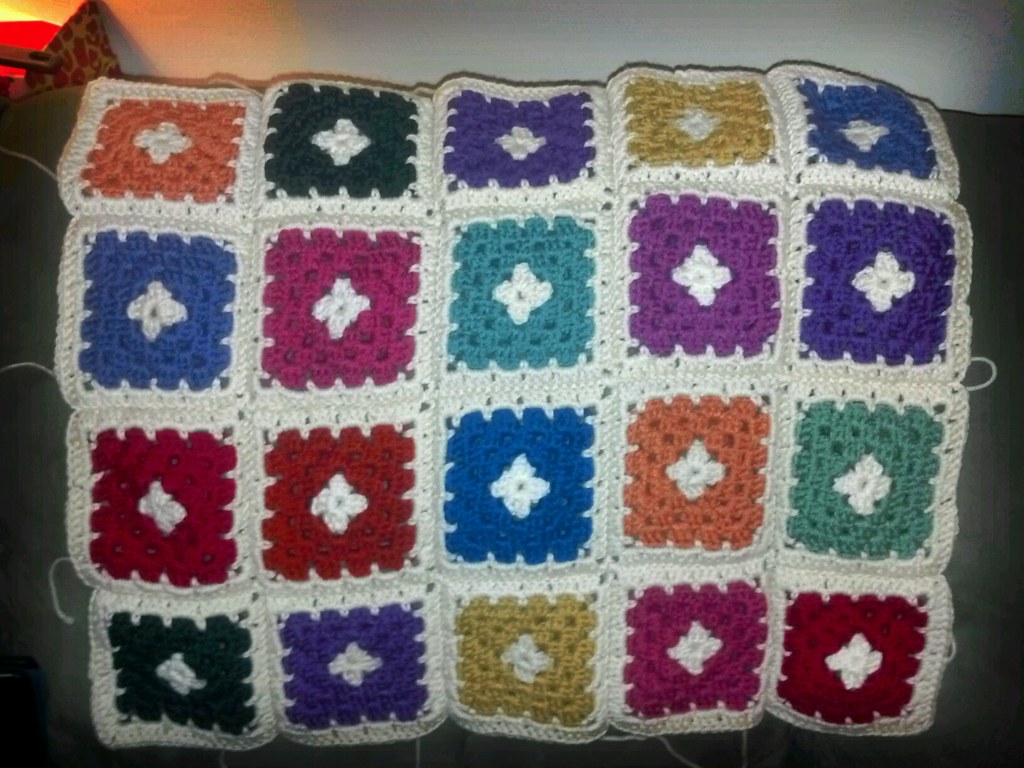
White Centered Granny Blanket

20 happy squares!
This poor blanket has been in progress since April of 2012.  Granted most of this has been passive work.  Making the squares was a great break from whatever project was driving me crazy at the time as well as being mindless.

As of this week however, all of the squares have been made.  Most of these still need their ends woven in and a white border but this is a huge accomplishment.  I can see a light at the end of the tunnel and I am even thinking about how I want to border this blanket.  If you have suggestions please let me know!

I have another set of blocks almost ready to join.

I want to get this blanket done soon because I want to wash and hang it out to dry on a line before fall/winter makes it too cold to do so.  I don't have enough room in my apartment for this thing to air dry and block so I need to take it to my Dad's house to line dry outside.    

I am also working on a post that will talk about how I used Excel to help me with my planned random layout.  It was really easy and I will give formulas and tips on how to make a "planned" random blanket that is interactive while your still in progress.

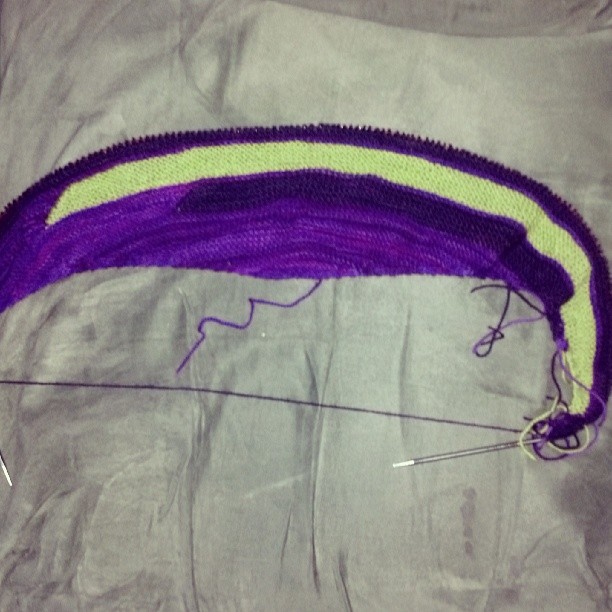
Happy Street

Happy Street!
I now have 2 of the stripes done and I am so happy with the color choices.  I try and work on this during knit night to get one stripe done.  I have no immediate plans to get this done anytime soon but seeing others done makes me want to finish this ASAP.

Anyway, that was my week.  Hope yours is going well.

For other WIPs check out Tami's Amis and Frontier Dreams

Check out my new meme Movie Madness Monday

<3 Heather

Monday, August 26, 2013

Movie Madness Monday 8


Welcome back.  This is a weekly meme where bloggers can share their thoughts on movies.  Any movie review is welcome including, new releases, old favorites or new found favorites.

What I am reviewing:

Star Trek: Into Darkness

image from imdb.com

I am really frustrated that I didn't see this in theaters but am happy that it finally came out on itunes.  I purchased it last night and as it was downloading started the movie.  The beginning opens with an allusion to what has been happening to the Enterprise crew since the last movie.  While on a routine mission to a remote uncivilized planet, they save the inhabitants from a volcano eruption but at the cost of violating a few key protocols.

The tone in the beginning is light and then the real plot begins.  We jump to London where we are introduced to John Harrison in a spectacular fashion.  From there the chase is on and we jump to the remote world of Kronos to catch up with Mr. Harrison who is a fugutive of the star fleet. Crosses, double crosses and triple crosses abound.

The movie was gripping and visually stunning.  I watched some of the special features and was pleased to see the amount of in camera work that was done versus CGI.  In conjunction with the story, the one liners in this movie were amazing.

Here are a few that I noted while watching:

Kirk to Uhura about fighting with Spock - "Oh my god what is that even like?"

Kirk to Chekov - "Go put on a red shirt"

McCoy - "Mr. Sulu remind me never to piss you off"

Kirk to Sock and Uhura - "Are you really going to do this right now?"

What I have reviewed:

We're the Millers
Pitch Perfect
Die Hard
The Decoy Bride
Despicable Me 2
Monsters University
Much Ado About Nothing

What I want to see:
Girl Most Likely - Open Now
To Do List - Open Now
The Heat - Open Now
The Spectacular Now - Open Now
Percy Jackson and the Sea of Monsters - Open Now
The World's End - Open Now

Don Jon - September 27th

Wait for BlueRay
Man of Steel
This is the End
Now You See Me
Fast and Furious 6
The Bling Ring

If you are participating in Movie Madness Monday, fill out Mr. Link Below. You do not have to comment but please link back to this post in your post to get the word out!

<3 Heather